George El-Hage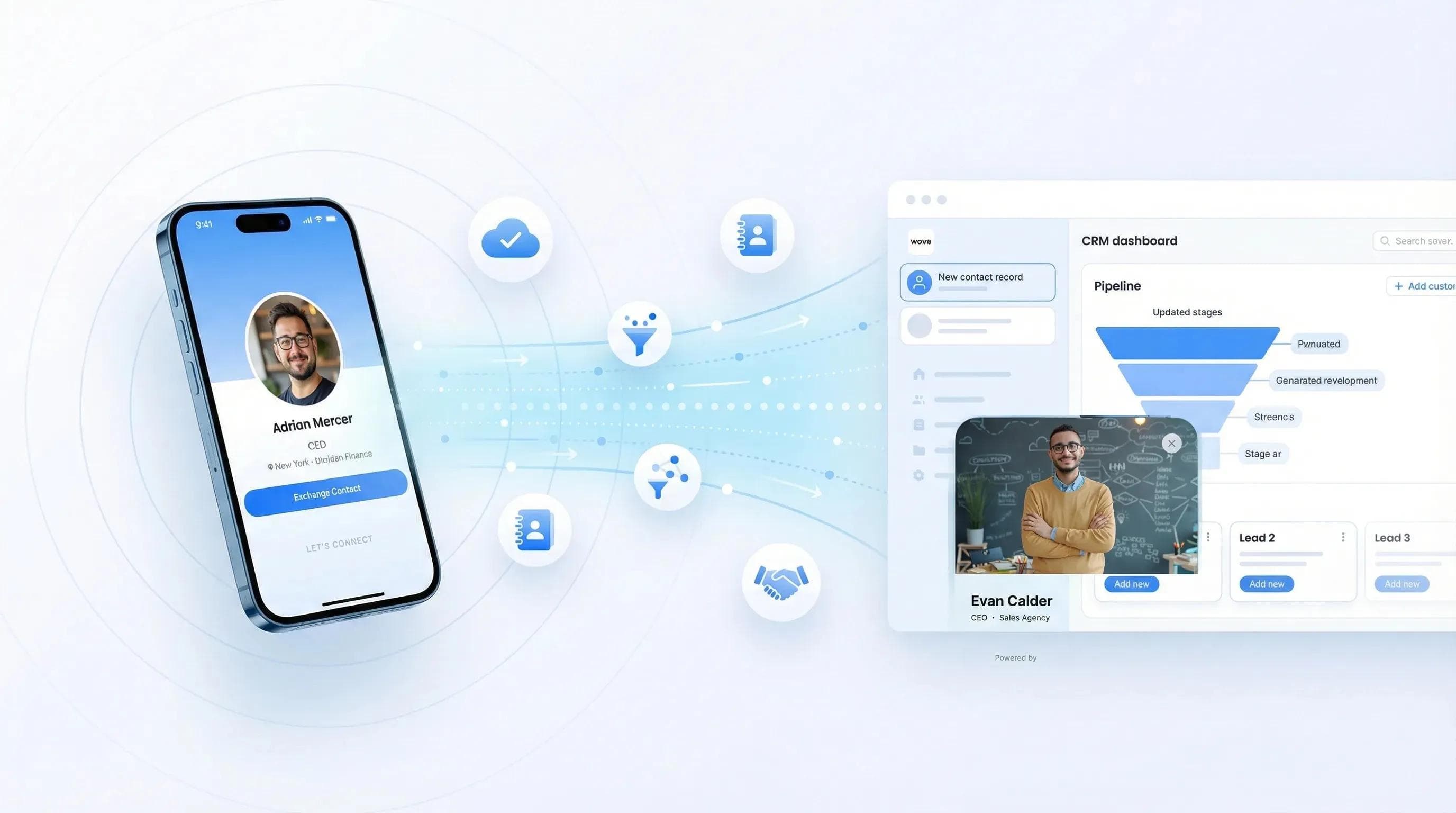
The short version: digital business cards with CRM integration send every contact you capture straight into your CRM, with no typing. Wave Connect connects natively to HubSpot, Salesforce, Microsoft Dynamics 365, Zoho, Pipedrive and HighLevel (plus Outlook contacts) with custom field mapping, and Zapier covers anything else. It covers both ways a contact reaches you at an event: people who share their details from your card, and badges or paper cards your team scans.
According to HubSpot's sales research, reps waste about 20% of their time on manual data entry; that's a full day per week. CRM integration eliminates that bottleneck entirely, and I've watched it transform how teams work events, conferences, and daily networking since 2020.
Digital business cards with CRM integration auto-sync new contacts to your CRM the moment someone shares their details from your card, with no manual data entry. Wave Connect offers native integrations with HubSpot, Salesforce, Microsoft Dynamics 365, Zoho, Pipedrive and HighLevel through direct API connections, not Zapier middleware, and backs them with SOC 2 Type II certification and browser-based sharing (no app required for recipients). Deploy CRM-connected cards for your entire team in under 10 minutes via Excel import.
- How auto-sync works: What happens between a card scan and your CRM pipeline
- Supported CRM platforms: HubSpot, Salesforce, Dynamics 365, Zoho, Pipedrive and HighLevel: what each integration delivers
- Why teams choose Wave Connect: The features that matter for team-wide CRM deployments
- Enterprise security: SOC 2 compliance and why it matters for CRM data flows
Auto-Sync Contacts to Your CRM the Moment They Scan
When someone scans your Wave Connect QR code or taps your NFC card, their contact information flows directly into your CRM as a new lead: automatically, in seconds, with zero manual work. The platform captures name, email, phone, company, and job title, then pushes it through a native API connection to your CRM. No copy-pasting. No Zapier middleware. No "I'll add them later." The contact just appears in your pipeline, tagged with the source event and ready for follow-up.
Here's what that actually looks like in practice:
- Someone scans your card at a conference, meeting, or networking event
- Wave Connect captures their details the moment they tap "Share Contact" on your profile
- Contact syncs to your CRM within seconds, mapped to the right fields, tagged by event
- Your follow-up workflow triggers: automated email, task assignment, lead routing, whatever you've built in your CRM
The whole thing runs in the background. Your reps don't configure anything. They scan, they network, they move on. The data handles itself.
💡 From My Experience: Before we built CRM integration into Wave Connect, I watched teams come back from trade shows with hundreds of paper cards and spend entire days manually entering contacts. Most never got entered at all; they sat in desk drawers. For teams still receiving paper cards, being able to scan business cards directly into your CRM is a meaningful step up, but the bigger leap is eliminating paper entirely. With auto-sync, the contacts actually make it into the system, and that's what gets them followed up.
And it's not just about speed. It's about what happens downstream. When contacts hit your CRM tagged with the event name and rep who captured them, your marketing team can measure event ROI accurately. Your sales managers can see which reps are generating the most conversations. That visibility didn't exist when everyone was stuffing paper cards into jacket pockets.
Supported CRM Platforms
Wave Connect integrates natively with HubSpot, Salesforce, Microsoft Dynamics 365, Zoho, Pipedrive and HighLevel, all through direct API connections that sync contacts in real-time without third-party middleware. "Native" matters here. It means the data flows directly between Wave Connect and your CRM, not through Zapier or a webhook relay that adds latency, costs extra, and breaks when APIs update at 2 AM.
The most popular integration we deploy. Contacts sync as new HubSpot contacts within seconds of a card scan. You can trigger HubSpot workflows automatically (follow-up emails, deal creation, task assignment) the moment a new contact lands.
- Real-time sync as contacts are captured
- Custom field mapping (standard + your custom HubSpot properties)
- Auto-tagging by event, campaign, or rep
- Triggers HubSpot workflow automation on new contact creation
Full setup walkthrough: Wave Connect + HubSpot Integration Guide
The integration I've set up most frequently for enterprise sales teams. Card scans create new Leads in Salesforce with proper field mapping, and your existing lead assignment rules route them automatically.
- Creates Salesforce Leads directly from card scans
- Maps to custom Lead fields (including "Lead Source Detail" for event attribution)
- Works with existing lead assignment and routing rules
Full setup walkthrough: Wave Connect + Salesforce Integration Guide
Same native API connection, same real-time sync. If you're a Zoho shop, card scans feed directly into your Zoho contact pipeline with auto-tagging and custom field support.
- Native API connection, no Zapier required
- Custom field mapping for Zoho's standard and custom modules
- Auto-tag contacts by event or campaign source
Full setup walkthrough: Wave Connect + Zoho CRM Integration Guide
Pipedrive, Microsoft Dynamics 365 and HighLevel get native integrations too, and Outlook contacts sync as well. For CRMs not listed above, such as Monday or Copper, Wave Connect connects through Zapier.
💡 From My Experience: At a SaaS conference last year, one of our clients captured over 200 contacts using Wave Connect's HubSpot integration, all synced in real-time. Their sales team started follow-up sequences the same evening while they were still at the event. They told me their response rate was significantly higher compared to previous events where they'd wait days to manually enter contacts. Speed kills in sales follow-up.
Why Teams Choose Wave Connect for CRM Integration
Wave Connect is built for teams that need CRM integration at scale, not individuals connecting a single card to a single CRM. When you're deploying 50, 200, or 500 CRM-connected cards, the requirements go way beyond "does it integrate with Salesforce?" You need centralized admin controls, consistent field mapping, and a deployment process that doesn't take weeks.
Here's what makes Wave Connect different for team deployments:
Import your employee list via Excel (name, email, title, department). CRM sync is configured once at the admin level; every card inherits the same mapping. No per-user setup.
Map CRM fields once for the whole team. When 200 reps scan cards at a conference, every contact hits the same CRM pipeline with standardized tags and field mapping.
Contacts are automatically tagged with event name, campaign, rep name, and date. Your marketing team gets clean attribution data without asking reps to remember to tag anything.
Recipients don't need to download an app to share their contact info. They scan, they see your profile in their browser, they tap "Share." Higher capture rates because there's zero friction.
Other platforms require app downloads for recipients, which kills your capture rate at events. I've seen teams switch from app-dependent platforms and immediately capture more contacts from the same events, just because they removed the "download our app" friction from the exchange. When you're at a trade show and have 30 seconds with someone, "scan this" beats "download this app, create an account, then scan this" every time.
A few other things that matter when you're evaluating platforms for team CRM integration: Wave Connect's team management dashboard lets admins lock brand templates so every card stays consistent. Contact export is free (some competitors paywall this). And analytics show you which reps are getting the most scans and which events are generating the most pipeline: data you can pull directly or have it flow into your CRM reports.
Built for Enterprise Security
Wave Connect is SOC 2 Type II certified, which matters the moment you start piping contact data into your CRM. Your CRM holds customer data governed by security policies. Any tool that feeds data into it should meet the same standard. Ask every vendor on your shortlist for its current SOC 2 Type II report, not a badge on a web page.
Here's why this matters practically: if your IT or compliance team reviews the tools that push data into Salesforce or HubSpot, they're going to ask about security certifications. With most platforms, the answer is "standard encryption", which is vague and usually means "we use HTTPS." That's table stakes, not security compliance.
What Wave Connect provides for enterprise security:
- SOC 2 Type II certified: audited by an independent third party, not self-reported
- SSO (Single Sign-On): your team logs in through your existing identity provider
- SCIM provisioning: automate user creation and deactivation through your identity management system
- Encryption: AES-256 at rest and TLS 1.3 in transit
- GDPR compliant, with a Data Processing Agreement and data privacy controls for teams operating in the EU
I've worked with compliance teams at financial services firms, healthcare organizations, and enterprise tech companies. The SOC 2 certification is usually the thing that moves the conversation from "we're interested" to "let's deploy." Without it, procurement processes stall for months while security teams try to assess risk.
💡 From My Experience: A Fortune 500 financial services client told me their previous digital business card vendor couldn't pass their security review: no SOC 2 and no SSO. They switched to Wave Connect specifically because our SOC 2 Type II report satisfied their compliance team in one review cycle. The security piece is invisible to end users, but it's the gate that enterprise IT has to clear before anything else matters.
See It in Action: Real Results from Real Teams
The teams getting the most from CRM integration aren't doing anything complicated; they're just letting the automation do its job while they focus on actual conversations. Here's what that looks like across a few different use cases I've seen firsthand.
Sales Teams at Trade Shows
This is the most common deployment. A 50-person sales team attends a major trade show. Each rep has a Wave Connect card with CRM sync enabled. Over three days, the team captures hundreds of contacts, all auto-synced to HubSpot with event tags, rep attribution, and follow-up sequences triggered automatically. The sales manager sees a real-time dashboard of contacts captured per rep. Follow-up emails go out that evening, not three days later when everyone's back in the office. For the badge-scanning side of the same show, see trade show leads into your CRM.
Real Estate Teams
Real estate agents use Wave Connect cards at open houses, networking events, and client meetings. Every contact lands in their CRM with the property address or event name as a tag. Their broker can see pipeline activity across the entire team without asking anyone to fill out a spreadsheet.
Insurance and Financial Services
Insurance agents and financial advisors need compliant data handling, which is where SOC 2 becomes non-negotiable. Agents use Wave Connect at industry events and client meetings, with every contact flowing into their CRM under proper data governance. No contact data sitting in someone's phone notes or a third-party app without security controls.
The CEO and Executive Use Case
Executives don't have time to enter contacts. Period. A CEO hands out their Wave Connect card at a board dinner or investor meeting, and the contact is in their personal CRM before they get back to the car. For C-suite users, the value isn't workflow automation; it's that no contact ever falls through the cracks because someone forgot to type it in.
💡 From My Experience: The biggest "aha moment" I see isn't the CRM sync itself; it's the attribution data. When a marketing director can pull a report showing "Conference X generated 147 contacts, 23 qualified leads, and 4 closed deals" because every contact was auto-tagged at capture, the conversation about next year's conference budget becomes a lot easier. That kind of reporting used to require manual spreadsheets and guesswork.
Frequently Asked Questions
Turn Every Card Scan Into a CRM Contact
Wave Connect integrates natively with HubSpot, Salesforce, Microsoft Dynamics 365, Zoho, Pipedrive and HighLevel. SOC 2 Type II certified. Browser-based, no app required for recipients. Deploy your whole team the same day.
Get Started FreeAbout the Author: George El-Hage is the Founder of Wave Connect, an event lead capture platform with a full digital business card built in, serving 200,000+ professionals worldwide. With 6+ years helping organizations transition from paper to digital networking, George has deep expertise in CRM integration, team deployment, and enterprise-grade digital card solutions. Wave Connect is SOC 2 Type II compliant and integrates with leading CRM platforms including Salesforce, HubSpot, Microsoft Dynamics 365, Zoho, Pipedrive and HighLevel. Connect with George on LinkedIn.